
Do You Need a Timer to Meditate?
Exploring the different ways to keep track of time during meditation, from simply watching a clock to using dedicated meditation timers.
By Clint
This is a topic so simple I already find it funny that I can write such a long blog post about it. I mean, your phone has a timer on it, problem solved?
The short answer is... well... TRUE! Meditation does not require any specific timer app, or even a clock at all. You can literally use a sand hourglass timer from your favorite board game. Mark the time with the shadows of the sun as they shift across a surface. Or have your pet turtle start at one end of the room and stop when they reach the other. Or just simply not care. Meditate until you feel like you're done meditating.
In my classes we start students off by breaking the mental model of needing a timer or alarm at all. We advise they just peek at a wall clock, a watch, or any other time source on occasion. The point is to let go of the rigid idea that meditation requires you to never open your eyes, or that it really matters whether you meditate for 19:45, 18:56 or exactly 20:00 minutes.
Once you truly learn to let go, though, it's common for the advantages of a timer to start to become interesting, depending on what technique you're practicing and your environmental conditions.
Most people end up picking between these options:
- Just keep peeking at a clock or watch. No harm in this. Some find it distracting to open their eyes and peek, though. Depending on your mental state, this may in itself create anxiety for busy minds constantly wondering "How long has it been?" and "How much time is left?" Other people find it freeing to get through to the point of giving up on caring about those questions, letting the technique itself solve its own problem over time.
- Use the default phone timer or alarm, and choose a more pleasant, soft chime sound. No harm in this either. Simple and easy. The biggest drawbacks are that the default sounds often aren't that soft, or can be annoying (at least to me) to hear at the end of a meditation. This of course also ties you to your phone in a way just peeking at a clock doesn't. Though simple and easy, a native phone timer is missing some other handy features of more dedicated meditation timers.
- Use a dedicated meditation timer app. Though not at all required, these often have handy features. The most popular meditation timer is Insight Timer. It's what I used when I started, as it has many cool features. Unfortunately, I found it increasingly nudging me toward a paid subscription or to answer personal questions just to get in and meditate. I got frustrated and made my own, with the features I wanted and without the annoying nagging of timers trying to get you to buy something. Let's explore the Deep Mental Rest meditation timer at freemeditationtimer.com to get a sense of why you might consider this option.
A Timer That Doesn't Get in Your Way
A key goal of this meditation timer was to just stay out of your way. It has the features of popular timers without push notifications trying to get your attention or companies trying to get you to fill out surveys or pay for premium subscriptions. It's simply a website that you can use on any device. Bookmark it, or "add to home screen" on mobile devices for quick access.
In its simplest use, you just pick a duration (it defaults to 20 minutes), hit Continue to be reminded to set your phone to Do Not Disturb, then "Begin Meditation" and you're off.
Knowing When You're Done Without an Alarm
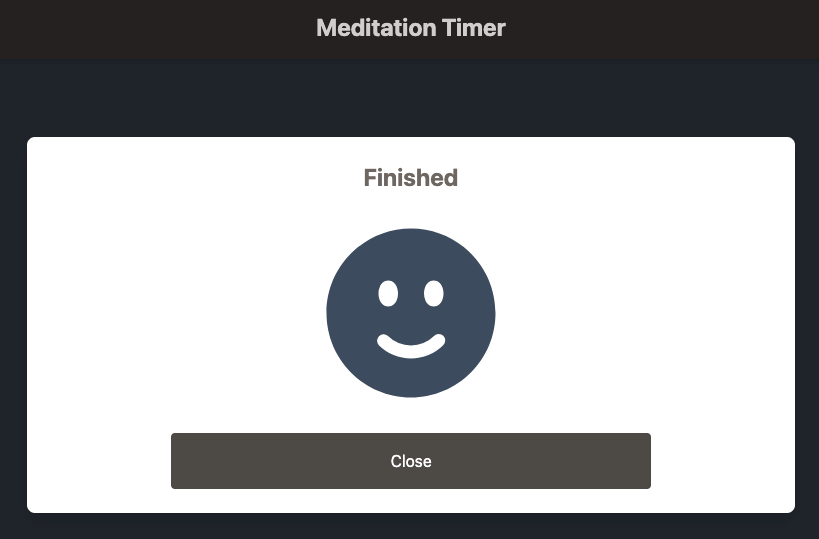
This was the original reason I built this timer, since no other timer I found had this feature. When the time is done, the screen shows a simple white box (with a smiley face) that's easy to see, even with your eyes mostly closed, just gently peeking. You barely have to open your eyes to know if you're done. No need to read numbers, remember what time you started or do the math on how much time is left. You just peek, and if you see a large, unmistakable white box with a smiley face, time's up. If not, keep going.
This is a small change, but it's surprising this sort of thing isn't common in meditation timers, as I think it makes a meaningful difference in the experience.
Gentle Bells, If and When You Want Them
Of course, sounds do have their purposes. A soft meditation bell can be a great way to start a meditation, cueing your attention that it's time to focus and giving you an audible focus point as you begin.
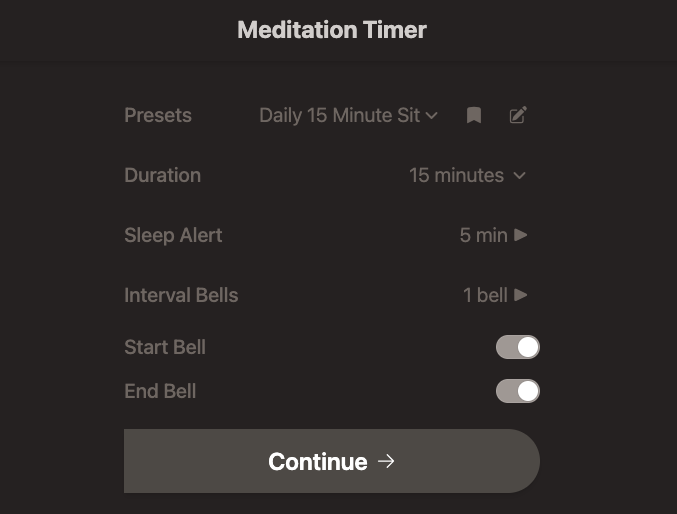
You can also set "Interval Bells," just like you can with the popular Insight Timer app. You can use these to mark the halfway point, or to divide longer meditations or breathwork into segments where bell chimes indicate when it's time to change techniques or enter new phases of practice, without opening your eyes.
Some even find that a bell chime during meditation helps with mind wandering, as the bell sound immediately grounds their attention back to their chosen object of focus.
I often use interval bells to signal a transition from one technique to the next, as is common with Metta loving-kindness meditation or Insight meditation. Very handy feature. Without the hassle of full-blown apps trying to get me to pay for something.
The end bell is another unique feature. It slowly fades in, avoiding any jarring experience if you're deep into meditation when time's up. This feature alone is worth it to me to use this web app over a phone alarm.
What If You Fall Asleep?
Many people are sleepy meditators and are prone to nodding off. Turning on the end bell is a good remedy for this, since it gently fades in to wake you up. But what about people who don't want the end bell at all, but have to make sure they get somewhere on time after meditation?
It Happens...
My wife was traveling and I was on the hook to pick up the kids from aftercare. I sat down to meditate first, and... you guessed it. I passed out. I woke up to a phone call from my wife, on a plane, telling me the school had called and "Where are you!?!?!" ...just before her phone lost its connection, leaving her to finish a cross-country flight without knowing whether something had happened to me or if the kids were okay.
Yeah, so I added the Sleep Alert. If you have to be somewhere, end bell or not, use this feature. You can set it to play an annoying beep a configurable number of minutes after your meditation ends. It's a last-resort backstop if you should happen to really pass out.
Building a Consistent Practice
Everything I've described here is free to all. Anyone can head to the timer site, save it to their home screen and use it. You can even save your bell and duration settings without creating any sort of user account (they're saved locally on your device).
But I did also add a few features for students who take classes with me (no additional charge, ever) that help them build consistent, daily practices.
First, a streak counter. If you log in, it tracks your meditations, and you can see both a daily streak (how many consecutive days you've meditated at least once) and a double streak (how many consecutive days you've meditated at least twice). This follows the habit formation tactic known as "don't break the chain." It's surprising how motivating it can be to build up a streak and not want to see it drop to 0. It's a similar tactic to crossing off the days on a paper calendar on the wall, but automated. You can even manually add a meditation if you happen to do one without the timer, to keep your streak going with no penalty for using other ways to track time (no cell signal, attended a group meditation, used your watch, etc.).
Second is the idea of using me as an accountability buddy. Every morning I get an email summarizing my students' streaks. If I see someone consistently back at 0, either they stopped using the timer (totally cool) or stopped meditating (less cool). I take a judgment-free approach to this, but it's another motivator for people to keep going if they know I can see when they fall off the wagon, and I may reach out just to check in and offer advice to get their practice going again.
TL;DR
This may sound strange coming from someone who built a timer and wrote a post this long about it, but you don't need a timer, or even a phone, to meditate. In fact, especially for those who already spend too much time on their phones (guilty as charged), any dependency on a phone to get your practice going can be counterproductive.
For those of us in the real world, though, where having your phone near you is already unavoidable, freemeditationtimer.com provides a simple and easy way to track your time and build a consistent daily practice, without the notifications, jarring alarms or other distractions.
Give it a try and let me know what you think. It's free to all. If you want a password to try streak logging, just contact me.
Want to comment on this post? Read it on Substack and join the conversation.
Keep reading
The Effort Knob - Finding the Right Intensity for Meditation
Understanding how to adjust the intensity of your meditation practice, from posture and alertness to attention and concentration.
Practice tipsWhen should you meditate?
When is the best time to meditate? The answer depends on your life. Here's how to build a consistent daily practice, find the ideal times to meditate, and understand why I recommend twice a day.
Practice tipsWhy group meditations?
I was skeptical that meditating on Zoom with other people could be any different from meditating by myself. Then I tried it. Here's why group meditation helps a practice stick.
Start with a free 30-minute conversation
Tell me what you're looking for. You'll leave knowing which practice fits you and how to begin. There's no cost and no commitment.
New to meditation? Join a free monthly intro session.
Prefer to write? Send me a message.